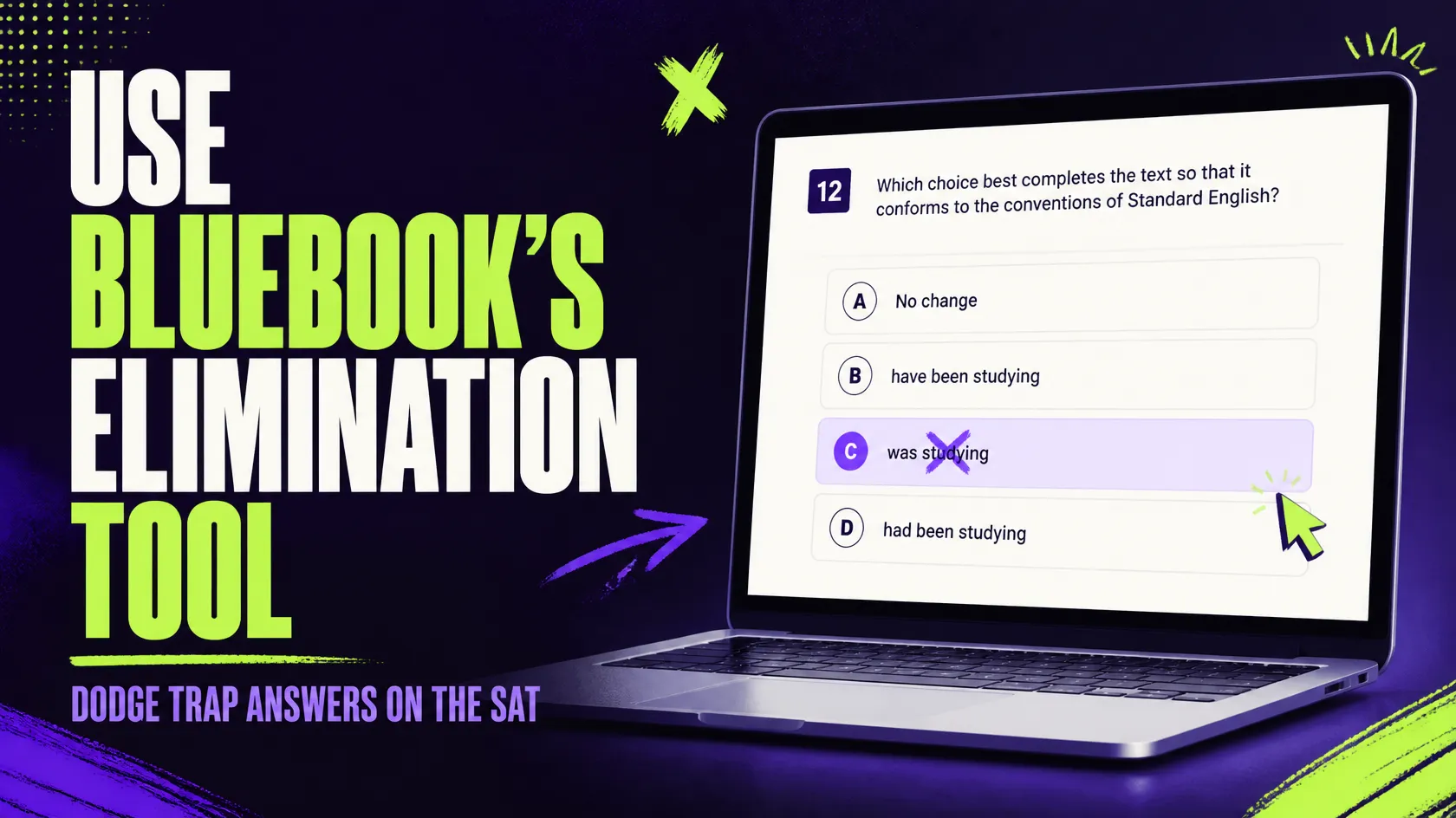
Every SAT test taker has experienced the fight or flight moment when staring down the screen with the timer. Use the elimination feature in SAT Bluebook to experience the oh-so-satisfying punch of crossing off wrong answer choices and staying organized.
While many students leave out this component as it appears trivial and straightforward, small tools are often the biggest difference on test day when trap answers are carefully created to trap the exhausted and hurried reader.
In this guide, I will show you precisely how the answer eliminator functions in the Bluebook app. Additionally, I will teach you the most common trap answer choices, how to eliminate them confidently, and ways to practice for your real Digital SAT.
What is the Elimination Tool in SAT Bluebook?
Bluebook is the College Board's official testing application. Students use it to take the actual Digital SAT and to do official practice tests.
Located within the Bluebook is an answer choice eliminator. According to the College Board, the tool will remind you of the answers that you have eliminated.
It is important for a description to show the functionality of the tool.. It does not provide an answer to the question for you, nor does it change your score, all it does is provide you with a visual trace of your own thinking.
When you cross an answer off, the app takes a mark; you can ignore it. So, you can really concentrate on the alternatives. Still if your choice changes you can hit the undo button so the answer is not crossed off anymore.
The tool is 'like a pencil line through an incorrect answer'. Students would do this all the time on paper quizzes, and Bluebook is just translating that practice to the computer.
How can trap answers be so effective that even the bright students are deceived?
You should comprehend the opposition before you teach the tool. A trap answer is a tempting wrong because it includes something true, known, or easier to change since it seems pleasant.
Test-writers do not build "random" wrong answers; they build "common mistake" wrong answers. Here is why trap answers work so well on stressed students:
- They sound intelligent. If one chooses to use more complex language, a mistake becomes righter than a simple commonplace mistake.
- They make real references. Sometimes a choice may quote the passage correctly but still not address the question asked.
- They give you your first instinct. Our brains enjoy validating our preconceptions, so when you're correct, you will stop double-checking.
- They tend to show up whenever you work against the clock. It seduces you into neglecting the final review that would reveal the error.
- The elimination tool handles all four problems. While you are forced to think when you are forced to explain why you are crossing out each choice!
Where the elimination tool works on the Digital SAT?
- The 2026 Digital SAT will be made up of 4 sections. You will complete 2 of the Reading and Writing sections and then complete 2 of the Math sections, with a brief break between the two sections.
- The complete test consists of 98 questions and takes two hours and 14 minutes. The Reading and Writing Modules each have 27 questions and take 32 minutes, and the Math Modules have 22 questions and take 35 minutes.
- The answer eliminator can be found in each section, and it can be used on both Reading and Writing, and Math. It's one of the few tools available for assistance in the entire exam.
- One limitation also needs to be pointed out. This tool only takes multiple-choice questions with four options of A B C and D. For some Math problems, which require manually typing the answers, there are no options to erase.
- For those student-produced response questions you have to depend on your own work and your scratch paper. So, store up your elimination prowess for the multiple-choice type questions.
What is the method for using the Elimination Tool in the SAT Bluebook app?
This table corresponds to how the tool functions in the program. Since College Board is able to tweak some minor elements of the interface, always check them in the Test Preview beforehand.
- Begin with the question- do an initial reading of the question itself. Make sure you understand the question that is being asked before you even see the choices, since it will prevent you from falling into traps set by dozens of incorrect answers.
- Find the “eliminate” button that appears next to the question. Find the symbol with three crossed-through letter characters and click on it to activate education for that question.
- Select the item you wish to delete. Once you determine an answer to be incorrect, press the delete sign and it will be struck through on your device's screen.
- Work on what is left. For each one of the following options, substitute the text or the calculations, and reject all the other options which do not "work".
- Reverse your answer if you have second thoughts. Retract allows Bluebook to undo an eliminated choice so you don't accidentally lose an answer.
- From what is left, choose your final answer. Take whichever option gets through all your selections, and move to the next question.
- Think of these steps as a loop here. Do not think of this as one single step. After much practice you will simply run this without even remembering to press the buttons in a couple of seconds.
What are the most common trap answers in Reading and Writing?
On the SAT Reading & Writing section, there is one question following each short reading selection. As the reading is so short, trap answers typically stalk in the narrow space between "sounds right" and "is right."
- Half-True Trap- This trap has one right piece of information and one wrong piece of information within one choice. Students tend to stop reading after the right piece and not read the entire choice. To avoid this trap, examine all parts of each choice and compare to the passage. If one part does not match, eliminate and strike out the entire choice.
- An Out-of-Scope Trap- This option is tempting, but the passage never mentions it. Like others, it appeals to the student's substantive outside knowledge. Yet, the SAT only gives credit to what is actually in the passage; therefore, if you cannot identify a line or phrase, discard the choice, even if you believe it to be correct.
- Extreme Wording - Words such as "always," "never," "completely," or "proves" typically represent answer choices that are too extreme. Reads passages tend to be nuanced so choices that are extreme aren't usually substantiated by the passage. Keep an eye out for this on the first read of the answer choices. Then cross out those choices unless the passage employs equally extreme language.
- Opposite Meaning Trap- Some wrong answers flip the author's point. They use similar words and a similar topic, but they say the reverse of what the passage says. This trap hurts students who read too fast. Therefore, check the direction of the idea in each choice, and eliminate any answer that points the wrong way.
- Wrong Question- Wrong Choice- The choice asserts something true from the passage but does not respond to the question asked. The student may be tempted to select it as they know the fact is true. Just stop and ask the question stem, "Does this choice answer what they asked?" If the answer is "NO" then cross it out.
Master SAT Reading & Writing with expert tips, proven strategies, and effective practice techniques to improve your accuracy, strengthen your grammar, and achieve your target SAT score in 2026.
Get Complete SAT Exam Details in One Place
Know the pattern, sections, timing, scoring, and registration steps before you start preparing for the Digital SAT.
How do you best eliminate answer choices when solving grammar and writing questions on the SAT?
- Remove answers that violate rules of grammar- Start with those obviously wrong answers: test whether any choice violates any basic rule of SAT (for example, spotting some of the common mistakes in decision-making: subject-verb disagreement, pronoun errors, verb tenses or sentence structures).
- Examine punctuation- some choices are wrong simply because of incorrect punctuation. Look out for misplaced commas, semicolons, colons and dashes, both too many and too few. A semicolon, for example, must look like it connects two full sentences:
- Remove redundant choices- The SAT looks for simple and concise sentences. When an answer is an idea already presented in the sentence, cut it.
- Watch for sentence fragments- Read the whole sentence with each answer choice. Eliminate any option that is not a complete sentence, such as a dependent clause.
- Subject-Verb Agreement: Ignore any superfluous words in between the subject and the verb; identify only the important subject. Eliminate any option whose verb does not agree with its subject.
- Clarity of pronouns: It is never correct to use pronouns with an indefinite reference. Get rid of the options with pronouns followed by something else such as "they", "it", "this", or "which."
- Comparing meaning and logic: Grammar is not everything. Consider the sentence with the remaining choices in it and see if it makes sense and is done in that particular context. "Eliminate those choices which change the original meaning."
- Go for clarity and conciseness. Where there are two choices that sound good grammatically, the option that the test would choose is the more concise one. Do not choose the most eloquent-sounding answer.
- Read around the underlined portion- think about the answer. Do not consider the answer choice in isolation. Read the sentence that precedes the question, as well as the sentence that follows the question, as the transitions, pronouns, and punctuation may be dependent on the sentence prior to or following that question.
- Exercise caution while using the "no change" choice- do not select "No change" only because the wording appears to be right. Let the other choices act as the guide for you.Top of Form
What are trap answers in the SAT Math section, and how can they be avoided?
Too many students believe that the process of elimination helps for the reading section only, even though it will also save you for the SAT Math.
- The Half-Way Answer- This choice is the number you get when you have a number in the middle of your work, you see it in the answer choices and you think "Oh! That's my answer!". Make sure to always cross out what the question isn't asking for. If the question asks for the value of x+3, then x is your trap answer.
- The Sign Error Answer- Wrong answers are often the right number with the wrong sign. If a student forgets a negative sign when solving an algebra problem, that answer will be waiting for them in the answer choices. Take it slow with signs and double check them, then get rid of anything that has a sign that disagrees with the question's text.
- The Wrong Unit answer- Word problems will give mixed units such as minutes vs. hours or inches vs. feet. The wrong unit answer looks like the correct answer but in a different unit than asked for in the question. Circle the units in the question on your scratch paper, then eliminate anything not using those units.
- The Reasonable-Number Check- Sometimes you can reason away choices, even on questions that seem to require math. If a question asks for a length or a percent, you can probably eliminate unreasonable numbers that would be way too big or small. This will save time with hard questions. Even if you can't solve the question, you can always eliminate the unreasonable choices to make your life easier.
- Use Desmos to prove eliminations- The Desmos graphing calculator comes with Bluebook for the Math section. You can graph an equation, or test an answer choice to see if it works. When a choice fails in Desmos, cross it out. This turns a guessing game into an evidence-based answer.
Crack the SAT with Expert Coaching in Delhi
Small batches, personalised guidance, and regular mock tests to help you reach your target score.
A Simple Elimination Routine You Can Repeat
Never value a lucky guess more than a reliable routine. Try this process on all multiple-choice questions until it becomes second nature.
- Look at the question stem first, and determine what a correct answer should do without reference to its choices. Decide, which answers are possibilities by rule or logic, and then eliminate others.
- Compare remaining choices. When your choices are down to two, find the subtle difference between the two, for it will always define the correct choice. Always choose a correct choice based on specific rules or lines of reasoning rather than what seems to be correct.
- Mark for review or move on to the next question if you feel that some choices seem correct. If you feel that some choices seem incorrect, try eliminating some more. This process takes practice and grows faster than your ability to eliminate two very wrong choices in under ten seconds.
How can students combine the Elimination Tool with other Bluebook tools to solve SAT questions more effectively?
The elimination tool gains power when used in concert with the other tools in the Bluebook app. Using in tandem! Since each tool caters to a slightly different need, it's probably worth using it plus Motivate.
- When on Reading and Writing questions, use the Annotation feature to underline/highlight the portion of the passage that points to an incorrect choice and then hide that choice to help you narrow down your options.
- Use the Line reader tool in conjunction with the elimination tool; it will block the text except the specific line that you want to refer to.
- Use the Mark for review flag in tandem with the elimination tool: flag a question if, after eliminating answer choices, you are still unable to determine which choice is correct.
- On Math questions, you will want to use the Reference sheet tool to view commonly-used formulas. This tool can help you eliminate answer choices that contradict a rule in this sheet. It can also help you if you want to double-check a calculation
- Finally, always write out your work on scratch paper in order to see why a choice is wrong. The Bluebook does not automatically perform calculations for you on the Math section.
What mistakes should students avoid when using the Elimination Tool in the SAT Bluebook?
But, even the most useful device can lessen your score if used improperly. Watch out for these mistakes so you won't have to make them on the test while practicing:
- If you began to remove the only correct option, you must have a valid reason for doing so. Otherwise, take advantage of the undo option.
- Never cross a choice out because of a gut feeling, rather than specific rules. The choice may seem crazy but you should only cross it out if you have a definitive reason to believe it is wrong.
- Remember to re-examine the last two choices of your answer. This is a mainly good tip if you cannot help but cross out the other options by mistake.
- Don't devote too much time to any one question. Remember the elimination tool is here to help you correct quickly so keep your focus and don't get caught up on what could be a very simple problem. It might be a good idea to flag this question and come back to it later, perhaps when time is running out in this section.
- Don't leave the question blank. Unlike traditional standardized tests, the Digital SAT doesn't deduct points for wrong answers, so always pick one. If you've narrowed down the answer choices to only a few options and are uncertain about, which one is correct, then you should take an educated guess, instead.
Not Sure What Your Raw Score Means?
- Turn your practice test results into an estimated SAT score instantly.
How to practice with the Elimination Tool before test day?
Ooshas Prep recommends becoming familiar with the tools in the Bluebook during your practice to avoid encountering them for the first time on test day. This recommendation is particularly helpful for the elimination tool.
First, familiarize yourself with the tools by watching the Test Preview Video in the Bluebook app. It will give you a taste of the tools without the stress of a real exam. Then, practice with official practice tests in the Bluebook app. Official practice tests mimic the features of real tests, including the adaptive algorithm of the Digital SAT. Ooshas Prep recommends taking a full-length practice test in one sitting, just as you would on test day. However, you may want to pause at any point if you wish to take a break, just as you would on test day.
After taking an official practice test, you will want to review your scores by watching Score Details. Watch the details for each choice you missed by using the scorebook. Note the correct choice, the one you selected, and the explanation. Spend more time analyzing choices that you consistently miss after eliminating the most clearly incorrect choices, for they reveal the choices that are most likely to mislead you. Keep track of all of these common errors in a basic notebook. Then review the list once a week. The more familiar you are with these common errors, the more likely you will be to ignore that answer and get a little quicker at spotting the mistake on your next practice test.
Conclusion
The Elimination Tool in SAT Bluebook can help students make better choices when they are unsure what the correct choice is. Students should have the skill to use the elimination tool. They can use it to cross out solutions that seem inaccurate so they have fewer problems to work out. This will likely be most helpful with grammar, writing, and math questions because of the similarity among solutions and their typical errors.
Once again students should reason out what the choice is trying to do by looking to the question and eliminate all choices in need of something else based on rules, calculations, logic, and context. After students have reasonably eliminated answers, they should compare their remaining options for differences and similarities and then use the Elimination Tool just to help the thought process, not to replace it. Students should combine the Elimination Tool with other tools, like reference sheet and the calculator where applicable. With continued practice, students can become more efficient at the elimination process and spot common errors or patterns of reasoning. By learning to identify common patterns of reasoning in wrong answer choices as well as double-checking their final answer, students can become more confident in their ability to use this tool in the digital SAT.
Frequently Asked Questions
The Elimination Tool enables students to eliminate answer choices that they feel are incorrect.
It enables students to narrow down the correct choice among those that they think are incorrect.
Students can use this tool anywhere that multiple-choice questions allow students to eliminate answer choices.
No, because it only allows students to narrow down the answer choices; therefore, students must still be able to choose the correct choice.
Student can cut options that have mistaken in punctuation grammar sentence structure, and word choices.
Students can eliminate choices that contradict calculations, units, signs, graphs, or any other condition given in the question.
It is best to eliminate choices that students think are incorrect because this will increase their odds of selecting the correct choice among the remaining options.
Students may wrongly eliminate an answer choice without proper justification or misunderstanding the question. Students may also eliminate some choices and select one of the remaining ones without further analysis.